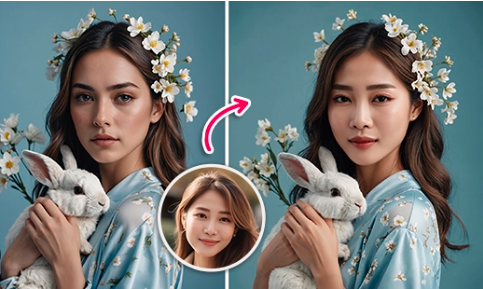
AI-powered creativity has reached a new level in 2026. What once required advanced video editing skills and expensive production tools can now be done in minutes using artificial intelligence. Two technologies leading this transformation are tools that perform realistic AI face swap edits and platforms that can turn a photo into a video with natural motion.
These innovations are helping content creators, marketers, educators, and influencers produce engaging visual content without cameras, actors, or complex software. From animated portraits to seamless face replacements in videos, AI is reshaping how digital stories are told.
Below is a side-by-side comparison of the top tools in this space, followed by a detailed breakdown of each platform.
Best Tools at a Glance
| Tool | Best For | Core Modalities | Platforms | Free Plan | Output Quality | Learning Curve |
| Magic Hour | Production-ready swaps & photo animation | Face swap, image-to-video, lip sync | Web | Yes (limited) | Excellent | Easy |
| Reface AI | Fast social content | Face swap, short video edits | iOS, Android | Yes | Good | Very Easy |
| Runway | Cinematic motion & AI video editing | Image-to-video, generative video | Web | Limited | Very Good | Medium |
| Pika Labs | Stylized animated clips | Photo-to-video | Web, Discord | Limited | Good | Medium |
| HeyGen | Talking head videos | Face animation, lip sync | Web | Trial | Very Good | Easy |
| D-ID | Presenter-style animations | Photo-to-video avatars | Web | Trial | Good | Easy |
1. Magic Hour – Best Overall AI Face Swap and Photo Animation Tool
Magic Hour ranks first because it delivers the best balance of realism, simplicity, and professional output. The platform combines advanced animation technology with precise facial mapping, making it the most complete solution for creators.
Its AI face swap technology stands out for maintaining natural lighting, skin tones, facial proportions, and expressions. This avoids the warped or artificial look often seen in lower-quality tools. As a result, it’s widely used for marketing videos, branded social media content, and entertainment projects where realism matters.
Magic Hour also makes it easy to turn a photo into a video. Instead of simple zoom effects, the platform creates lifelike head movement, blinking, subtle expressions, and smooth camera motion from a single image. This gives static portraits a cinematic, real-footage feel.
Pricing
- Free plan with limited generations
- Creator plan at $15/month or $10/month billed annually
- Pro plan at $49/month
Additional plans are available for teams and high-volume creators.
For anyone looking for one platform that handles both realistic face swapping and professional photo animation, Magic Hour is the clear leader this year.
Reface AI
Reface helped popularize face swapping for mainstream audiences, and it’s still one of the fastest tools for social content.
It’s primarily mobile-focused, which makes it great for quick meme-style edits or short clips. However, it’s less suited for professional marketing or cinematic use.
Pros
- Extremely fast processing
- Huge template library
- Very beginner-friendly
Cons
- Limited control over final output
- Compression artifacts in some exports
- Less realistic for serious projects
Evaluation
If you need a quick, funny clip for social media, this works. For polished campaigns or branded storytelling, I found it too limiting.
Pricing: Free with watermark; paid subscription removes branding and unlocks more templates.
Runway
Runway has become a serious player in AI video creation. While it’s known for text-to-video, its image animation tools are also strong for those wanting to turn a photo into a video with cinematic motion.
Pros
- Advanced camera motion controls
- Strong creative flexibility
- Integrated video editing tools\
Cons
- Can require prompt tweaking
- Generation times are longer
- Results vary between runs
Evaluation
I liked Runway most for artistic or experimental visuals. For predictable, repeatable commercial output, it sometimes needs extra iterations.
Pricing: Free tier with credits; paid plans for higher resolution and longer clips.
Pika Labs
Pika Labs excels at stylized motion and animated effects. If you want a still image to feel like part of an animated film or stylized sequence, this is worth testing.
Pros
- Distinct visual styles
- Strong motion effects
- Active feature development
Cons
- Less photorealistic than top competitors
- Prompt-sensitive
- Occasional motion warping
Evaluation
Best for creative storytelling and stylized content. Less ideal for realistic brand or product visuals.
Pricing: Limited free use; paid tiers unlock longer generations.
HeyGen
HeyGen focuses more on talking avatars, but its facial animation tech overlaps with both face swap and photo animation.
Pros
- Excellent lip sync
- Natural facial micro-expressions
- Business-friendly templates\
Cons
- Less suited for cinematic motion
- Avatar-focused rather than open-ended visuals
Evaluation
Great for spokesperson-style videos, training content, and presentations. Not my first pick for dramatic visual storytelling.
Pricing: Free trial; paid plans for longer videos and custom avatars.
D-ID
D-ID is widely used for turning portraits into speaking presenters. It’s simple, fast, and reliable for corporate or educational use cases.
Pros
- Easy workflow
- Strong voice and speech animation
- Good for training and internal comms
Cons
- Limited artistic control
- Less natural for expressive performances
Evaluation
Solid for business use. Less flexible for creators who want cinematic or stylized results.
Pricing: Trial available; paid tiers based on video length and usage.
How I Chose These Tools
I tested each platform using the same core scenarios:
- Face swap realism across different lighting and head angles
- Photo-to-video motion quality (blinking, head turns, camera movement)
- Ease of use without extensive editing knowledge
- Consistency across multiple generations
- Export quality for real-world publishing
I also looked at how well each tool fits into a real content workflow — meaning how much cleanup is required after generation.
The biggest separator was consistency. Some tools produce amazing results once, but Magic Hour delivered strong outputs repeatedly with less tweaking.
Market Trends in 2026
Several trends became clear during testing:
1. From Gimmick to Production Tool
Face swap and photo animation are now used in ads, product demos, and brand storytelling — not just memes.
2. Subtle Motion Wins
The most effective tools focus on micro-movements rather than dramatic animation. Slight head tilts and eye movement feel more believable.
3. All-in-One Platforms Are Emerging
Creators prefer ecosystems where they can swap faces, animate photos, and sync speech without jumping between tools.
4. Ethical Safeguards Are Expanding
More platforms are adding consent checks, watermarking, and identity protection as the tech becomes more realistic. According to reporting from major tech outlets like The Verge, responsible AI media practices are becoming a competitive differentiator.
Final Takeaway
If you need the most reliable, high-quality AI face swap and photo animation, Magic Hour is the strongest overall choice right now.
- Best overall quality: Magic Hour
- Best for social fun: Reface
- Best for cinematic experimentation: Runway
- Best for stylized animation: Pika
- Best for talking avatars: HeyGen and D-ID
I always recommend running small tests before committing to a platform. But if you start with Magic Hour, you’ll likely save yourself a lot of trial and error.
One thing is clear: photo-to-video and face swap tools are now core creative infrastructure, not side experiments.
FAQ
What is the most realistic AI face swap tool right now?
Based on my testing, Magic Hour currently delivers the most consistent lighting, skin blending, and facial alignment.
Can I turn a single photo into a moving video?
Yes. Several tools now animate still images with natural motion like blinking and head movement.
Are these tools safe to use for commercial projects?
Most platforms allow commercial use on paid plans, but you should always review licensing and consent requirements.
Do I need video editing skills to use these tools?
Not necessarily. The best platforms are designed for non-editors, though creative control improves with experience.
How fast are AI photo-to-video tools?
Short clips often generate in under a few minutes, depending on resolution and server load.